Modules
A module is a self-contained unit of server-side logic - handlers, background processing, and any state it owns - bundled behind a small interface so it can be configured and deployed independently. In FigNet, modules implement FigNet.Core.IModule and are used to add custom logic to a FigNet application in a modular way.
FigNet also has a closely related game concept: a game is loaded on demand when an Entangle room is created (rather than at server startup) but shares the same folder layout, manifest format, loader, and admin/cluster tooling as modules. Most of this page applies to both; differences are called out where they matter.
The IModule interface
namespace FigNet.Core
{
    public interface IModule
    {
        // Called once when the module is added to the server.
        // Register handlers, subscribe to server events, allocate resources here.
        void Load(IServer server);

        // Called by ModuleLoader before the module's AssemblyLoadContext is unloaded.
        // Implementations must release every reference that could pin the load context:
        //   1. Unregister all message handlers registered into FN.HandlerCollection / FN.*Funcs.
        //   2. Detach every IServer / peer / room event subscription.
        //   3. Stop and join any threads, timers, or async tasks owned by the module.
        //   4. Dispose all IDisposable resources.
        //   5. Null out static caches that hold types or delegates from this module's assembly.
        // Anything missed keeps the ALC alive and prevents reload from reclaiming memory
        // (functional behavior is gone once UnLoad returns; only memory is leaked).
        void UnLoad();

        // Per-frame tick. ServerApplication wraps each call in try/catch; a thrown exception
        // is logged and isolated, and the rest of the tick continues.
        void Process(float deltaTime);
    }
}
Writing a module
public class TestModule : IModule
{
    // define your properties & logic here

    public void Load(IServer server)
    {
        FN.Logger.Info("test loaded");
        FN.HandlerCollection.RegisterHandler(new TestHandler());
    }

    public void Process(float deltaTime)
    {
    }

    public void UnLoad()
    {
    }
}
Configuring modules and games
Modules and games are declared in ServerConfig.yaml (see Configuration for the full config schema). Two shapes are supported side by side.
Legacy shape (assembly + type)
The original shape points directly at an assembly and type name. AssemblyName is the name of the DLL, and Type is the fully-qualified class name that implements IModule:
Modules:
  - AssemblyName: EntangleServer
    Type: EntangleServer.Modules.Lobby.FNELobby
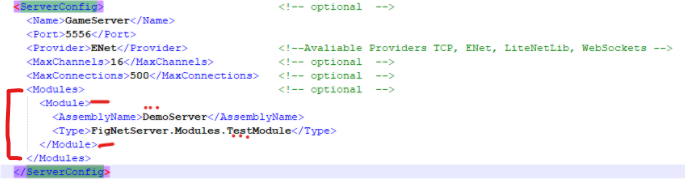
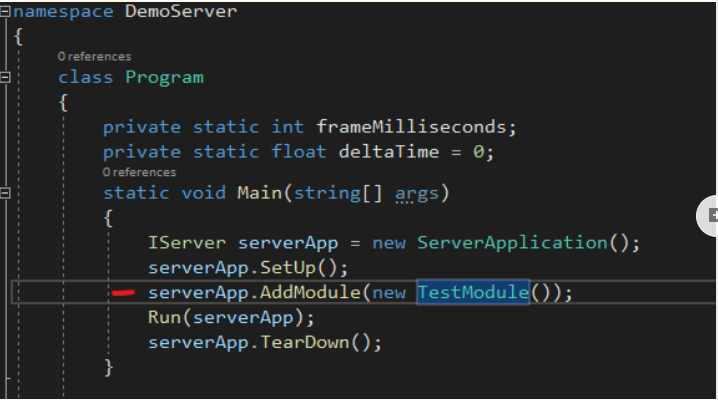
Modules use reflection to create instances from this configuration. First-party modules whose DLL ships inside the host executable (for example EntangleServer.dll, which is both the host binary and the module containing FNELobby) stay on this legacy shape, since the manifest-based loader can't cleanly load an assembly the host has already pinned in its own load context.
On Unity IL2CPP, reflection-based instantiation is not available. Load the module manually in code instead of relying on the config-driven path.
New shape (manifest-driven, name + enabled)
Admin-uploaded modules, and any module or game distributed as its own folder, use a thin enable-list instead:
Modules:
  - Name: Entangle
    Enabled: true
Games:
  - Name: TSDemo
    Enabled: true
The Module configuration entry (FigNet/Core/Configuration.cs) carries both shapes at once; whether Name is set determines which loading path is used. FigNet/Core/FigNet.cs (LoadModules, around line 373) branches on this:
if (module.UsesNewLayout)
    LoadModuleFromManifest(server, modulesRoot, module.Name);  // manifest-aware path
else
    LoadModuleLegacy(server, baseDir, module);                 // Assembly.LoadFrom path
For games, GameLoader.LoadRoomLogic (EntangleServer/Modules/Utils.cs) tries the manifest path first (TryLoadManifestGame), then falls back to the legacy TypeScript and CLR loading paths.
Folder layout and manifests
Each module or game distributed with the new layout lives in its own folder next to the server executable, alongside a manifest.json that carries its metadata - version, entry point, dependencies, and runtime kind. The YAML config only answers "is this enabled?"; everything else about identity comes from the manifest, since the manifest is generated by whoever builds the module and the YAML is hand-edited by the operator running the server.
<exe-dir>/
  Modules/
    {Name}/
      manifest.json
      {EntryAssembly}.dll
      Dependencies/
        SomeLib.dll
    .staging/                 # transient unpack target during upload
    .backups/
      {Name}/
        2026-05-02T10-00.zip  # created automatically before each replace
  Games/
    {Name}/
      manifest.json
      {EntryAssembly}.dll | build.js
      Dependencies/           # C# games only
Notes on the layout:
- Flat, not versioned. There is a single active copy of a module per name (no
Modules/{Name}/{Version}/subfolders). Only one version of a module can be active at a time in any case, since handlers are keyed by aushort msgIdand two versions of the same module would race for the same opcode. Rollback is handled through.backups/: a ZIP snapshot is taken automatically before any replace, and rolling back means extracting that backup into staging and atomically renaming it into place. .backups/lives under the runtime folder, not a sibling directory, so a plain archive ofModules/captures history. It is excluded from manifest enumeration.
Manifest schema
Defined in FigNet/Core/Manifest.cs:
{
  "schemaVersion": 1,
  "name": "Entangle",
  "version": "1.2.0",
  "kind": "module",
  "runtime": "clr",
  "author": "FigNet",
  "description": "...",
  "entryPoint": { "assembly": "Entangle.dll", "type": "Entangle.EntangleModule" },
  "tsScript": "build.js",
  "dependencies": {
    "assemblies": ["SomeLib.dll"],
    "modules": [{ "name": "FnCore", "minVersion": "1.0.0" }]
  },
  "minServerVersion": "2.0.0"
}
| Field | Required when | Why it exists |
|---|---|---|
schemaVersion | always | Future-proofing; the loader can refuse unknown majors. |
name | always | Folder name and identifier for the YAML enable-list. Validated by IsSafeName (alnum plus -, _, ., up to 64 chars, no leading dot). |
version | always | SemVer recommended. Surfaced in the admin UI; not enforced for ordering. |
kind | always | "module" (host-loaded at startup or by admin) or "game" (loaded on demand at room creation). |
runtime | always | "clr" for C# DLLs, "typescript" for ClearScript V8 bundles. Games can be either; modules must be clr. |
entryPoint.assembly | runtime: clr | DLL filename inside the folder. |
entryPoint.type | runtime: clr | Fully-qualified type implementing IModule (modules) or IEntangleRoom (CLR games). |
tsScript | runtime: typescript | JS bundle filename inside the folder. |
dependencies.assemblies | optional | Filenames in the module's Dependencies/ folder, loaded into the module's load context before the entry assembly. |
dependencies.modules | optional | Cross-module dependencies. Currently parsed but not enforced beyond presence. |
minServerVersion | optional | Documented but not currently enforced; reserved for a future check against FN.VERSION. |
Hot reload via AssemblyLoadContext
Assembly.LoadFrom cannot unload anything from the default load context - that's a CLR-level constraint. To support hot-load and hot-unload of modules, FigNet loads each module into its own collectible AssemblyLoadContext (see the .NET docs on unloadability).
Assembly unification
If a module's load context loaded FigNet.Core.dll itself, the IModule interface inside the module would be a different Type from the host's IModule, and casts would fail. FigNet/Core/ModuleLoadContext.cs avoids this by unifying host-shared assemblies onto the default load context:
protected override Assembly Load(AssemblyName assemblyName)
{
    // Unify host-shared assemblies on the default ALC.
    foreach (var loaded in Default.Assemblies)
        if (loaded.GetName().Name == assemblyName.Name)
            return null;   // delegate to the parent load context
    ...
}
Returning null is the documented contract for "delegate to the parent load context." Any assembly already loaded by the host (FigNet.Core, EntangleCommon, System.*, Microsoft.*, Newtonsoft.Json, and so on) unifies on the default context. Only the module's own private dependencies, placed in Dependencies/, load into the module's own context. If you ever hit a Cannot cast 'Foo' to 'IFoo' error from a module, this is the first place to check.
ModuleLoader
FigNet/Core/ModuleLoader.cs is the core API for loading, unloading, and reloading modules:
public static class ModuleLoader {
    public static bool Load(IServer server, string modulesRoot, string name, out string error);
    public static bool Unload(IServer server, string name, out string error);
    public static bool Reload(IServer server, string modulesRoot, string name, out string error);
    public static bool IsLoaded(string name);
    public static IReadOnlyList<LoadedModuleInfo> List();
}
All public methods are idempotent with respect to no-op calls (Load of an already-loaded module returns success; Unload of a module that isn't loaded returns failure with a clear error).
Reload keeps the old module running on failure. The sequence is:
- Load the new load context, instantiate the module, and call
IModule.Load(server)inside a try/catch. - If anything throws, the new context is disposed and the old module keeps running; the public API returns the error.
- Only once the new module is verified does the loader call
UnLoad()on the old instance and drop the old load context.
There is a brief window where two instances of the same module are attached to the server, since the tick loop iterates modules by index - both run for at most one frame.
IServer.RemoveModule (FigNet/Core/IServer.cs) is a default interface method (=> false) so implementations that don't support removal (Unity, tests) don't break; FigNet/Server/ServerApplication.cs overrides it and also wraps each module.Process(deltaTime) call in try/catch so a module crashing during a tick is logged and isolated rather than killing the loop.
GC verification
After UnLoad() returns, the loader checks that the module's load context actually got collected:
for (int i = 0; i < UnloadGcAttempts && alcRef.IsAlive; i++) {
    GC.Collect();
    GC.WaitForPendingFinalizers();
}
Up to 10 cycles; if the load context is still alive after that, the loader logs a warning. This isn't a leak detector by itself - it's a check that the module cleaned up after itself as required by the IModule.UnLoad() contract above.
Admin API and dashboard
Module and game lifecycle is also exposed over HTTP for remote management, mirrored across /api/modules/... and /api/games/.... All endpoints are JWT-gated and audit-logged.
| Verb | Path | Behavior |
|---|---|---|
| POST | /api/{kind}s/upload | Multipart ZIP upload. Extracts to a staging folder, validates the manifest, backs up any existing folder of the same name to .backups/, then atomically renames staging into place. Does not auto-load. 50 MB cap by default. |
| POST | /api/{kind}s/{name}/load | ModuleLoader.Load for modules, or sets Enabled=true for games (games load on demand at room creation). |
| POST | /api/{kind}s/{name}/unload | ModuleLoader.Unload for modules, or Enabled=false plus cache eviction for games. |
| POST | /api/{kind}s/{name}/reload | ModuleLoader.Reload for modules, or a script reload plus cache eviction for games. |
| DELETE | /api/{kind}s/{name} | Unload, back up, delete the folder, and remove the entry from YAML. |
| GET | /api/{kind}s/manifests | Inventory of every folder under Modules/ or Games/, with manifest data plus enabled/loaded runtime state. |
A legacy GET /api/modules endpoint is kept for backward compatibility, extended to also return version, loaded, and layout per entry.
The upload pipeline (InstallFromZipBytes) is shared between the master's local upload path and a node's cluster-replicate handler:
- Extract the ZIP into a staging folder, validating that every entry's resolved path stays inside the staging folder (protects against path traversal).
- Locate the manifest, either at the staging root or inside a single top-level wrapper folder.
- Load and validate the manifest, checking that its
kindmatches the endpoint. - Validate the name (
IsSafeName). - If a folder of that name already exists: unload it (modules only), back it up to
.backups/, and delete it. - Atomically move the staging folder into its final location.
- Update the enable-list entry and persist
ServerConfig.yaml.
Audit events follow a simple freeform shape, for example:
module.upload    target=<name>            ok:created | ok:replaced | fail:<reason>
module.load      target=<name>            ok | fail:<reason>
module.unload    target=<name>            ok | ok:not-loaded | fail:<reason>
module.reload    target=<name>            ok | fail:<reason>
module.delete     target=<name>            ok | fail:<reason>
module.replicate target=<name>            ok:created | ok:replaced (cluster only)
game.*           same shape
The admin dashboard exposes this through a shared "manifest kind manager" component (used for both the Modules and Games pages), with drag-drop ZIP upload, manifest preview, and per-row Load/Unload/Reload/Delete actions.
Cluster fan-out
In a clustered deployment, module and game updates fan out from the master node: an admin uploads a ZIP to the master once, the master persists it locally, and then replicates the same bytes to every online non-master node. Lifecycle actions (load/unload/reload/delete) fan the action out to nodes rather than re-sending bytes.
The cluster command set adds ten commands to the load balancer:
module.replicate  module.load  module.unload  module.reload  module.delete
game.replicate    game.load    game.unload    game.reload    game.delete
Per-action timeouts differ because a replicate command carries the ZIP payload itself:
| Action | Timeout | Reason |
|---|---|---|
| Replicate (carries ZIP) | 30s | Multi-MB transfer plus extract, validate, atomic rename, and persist YAML. |
| Load / Unload / Reload | 5s | Pure local CPU work once the bytes are already on disk. |
| Delete | 5s | Folder deletion, proportional to file count. |
Because of the assembly dependency direction (EntangleLoadBalancer references only FigNet and EntangleCommon; EntangleServer references EntangleLoadBalancer), the load balancer cannot call the admin endpoints' install logic directly. A bridge interface in EntangleCommon decouples the two:
public interface IClusterModuleHandlers {
    (bool Success, string Error) InstallFromZip(string kind, string name, byte[] zipBytes);
    (bool Success, string Error) RunLifecycle(string kind, string name, string action);
}
EntangleServer implements this interface by reusing the same install pipeline and ModuleLoader/GameLoader calls used locally, and binds it in Program.cs on every role (master, node, and standalone), since node receivers need it as much as the master does. When the load balancer sees a module.* or game.* command, it resolves this interface and dispatches; if nothing is bound (the process isn't an Entangle host), it returns a clean error.
On the master, every module/game endpoint fans out after completing its local action and returns the per-node result set:
var fanout = await FanOutSimpleAsync(kind, name, action, ctx.RequestAborted);
return Results.Ok(new { ..., ClusterFanout = fanout });
On a standalone deployment (no master role), fan-out is a no-op. On a master, it runs across every online non-master node concurrently and returns a per-node { NodeKey, Success, Error } result; a node that's offline simply reports Success=false with an explanatory error, and the master itself stays consistent regardless of node failures.
Known limitations
- No catch-up replication. A node that was offline during an upload does not sync automatically when it reconnects.
- No two-phase commit. If some nodes succeed and others fail during a fan-out, the master does not roll back the nodes that succeeded. The admin sees the per-node result and can retry manually.
Unity-side module architecture and distribution
On the Unity client, there is no hot-reload equivalent - every change recompiles, and clients ship as a player build. What Unity modules do share with the server side is a manifest describing identity and version, so client and server agree on what's running.
Folder convention
Every module under Assets/Modules/{Name}/ follows this layout:
Assets/Modules/{Name}/
  fignet-module.json          # required manifest, mirrors server manifest fields
  Core/
    {Name}.asmdef             # runtime asmdef; name matches the module name
    *.cs
  Editor/                     # optional editor-only scripts
  {Name}Common/                # optional wire-format models shared with the server
    {Name}Common.asmdef
  Unity/                      # MonoBehaviour adapters and Resources/
    Resources/
      {Name}Config.asset      # ScriptableObject runtime config (matches manifest.configResource)
  Sample/                     # optional showcase scenes
  Plugins/                    # optional native libraries
Rules:
fignet-module.jsonlives at the module root, not insideCore/.- The runtime asmdef name matches the manifest
name. Sample/never referencesEditor/or vice versa, and neither is required byCore/.- Module-private third-party DLLs go in
Plugins/and are listed underprecompiledReferencesin the asmdef. - Cross-module references go through asmdef GUID references, not path imports.
Manifest schema (Unity side)
Defined in Assets/FigNetCore/Editor/FigNetModuleRegistryGenerator.cs:
{
  "schemaVersion": 1,
  "name": "Entangle",
  "version": "1.2.0",
  "kind": "module",
  "side": "client",
  "author": "FigNet",
  "description": "Game-state, room, and entity-replication client.",
  "compatibleServerVersions": "^1.2.0",
  "asmdefs": ["Core/Entangle.asmdef", "FigNetCommon/FigNetCommon.asmdef"],
  "dependencies": [{ "name": "FigNetCore", "minVersion": "1.0.0" }],
  "configResource": "EntangleConfig"
}
| Field | Required | Maps to / used for |
|---|---|---|
schemaVersion | yes | Future schema migration. |
name | yes | Folder, asmdef, and generated FigNetModules.{Name} class name. Must be a valid C# identifier. |
version | yes | The single source of truth for "what version of this module is shipped in this Unity project." |
kind | yes | "module" only on Unity today (no client-side games yet). |
side | yes | "client" (Unity-only) or "shared" (also runs on server). Informational. |
compatibleServerVersions | recommended | SemVer range, surfaced as FigNetModules.{Name}.CompatibleServerVersions so runtime code can warn on mismatch. |
asmdefs | recommended | Editor-time hint for which asmdef paths belong to this module. |
dependencies | optional | Names and minimum versions of other modules this one needs; currently informational. |
configResource | optional | Resources.Load<T>(...) key for the module's ScriptableObject config, surfaced as FigNetModules.{Name}.ConfigResource. |
The schema tracks the server schema's vocabulary (name, version, kind, dependencies) where it makes sense, and adds side, compatibleServerVersions, asmdefs, and configResource for things that only matter on Unity.
The generated registry
Assets/FigNetCore/FigNet/Generated/FigNetModules.Generated.cs is auto-generated and compiles inside the FigNet asmdef, so any module that already references FigNet can read FigNetModules.{Name}.Version without an extra dependency:
namespace FigNet
{
    public static class FigNetModules
    {
        public static class Entangle
        {
            public const string Name = "Entangle";
            public const string Version = "1.2.0";
            public const string CompatibleServerVersions = "^1.2.0";
            public const string ConfigResource = "EntangleConfig";
            // ...
        }
        public static IReadOnlyList<Entry> All { get; } = ...;
    }
}
Using a generated class instead of a runtime Resources.Load<TextAsset> lookup on the JSON keeps FigNetModules.Entangle.Version type-checked at compile time, keeps the const strings inlined at zero runtime cost, and turns manifest typos into compile errors instead of runtime surprises.
The registry regenerates automatically three ways:
- An
AssetPostprocessorregenerates it whenever anyfignet-module.jsonis saved. - An
[InitializeOnLoadMethod]recreates it on Unity startup if the generated file is missing. - A
FigNet > Refresh Module Registrymenu item regenerates it on demand.
The pre-generated file is checked into the repo so a first-time clone compiles without opening Unity.
Distribution
For first-party modules (Entangle, FnVoice, AdminPanel, LoadBalancer), distribution is "checked into the same repo" - any change to fignet-module.json regenerates the registry on the next Unity domain reload.
For a third-party or partner module:
- Drop
Assets/Modules/{NewModule}/into the project (includingfignet-module.json). - The
AssetPostprocessorruns the generator on import, andFigNetModules.{NewModule}.Versionbecomes available. - Reference the new module's asmdef from your game code via GUID.
- Set
compatibleServerVersionsin the new module's manifest to whatever server version it was tested against.
There is currently no UPM package.json export or .unitypackage build script; the manifest fields (name, version, description, dependencies) are shaped so that a future exporter could map them directly onto a UPM package.json.
Server/Unity version drift
When a Unity client connects, the server sends FN.VERSION plus the list of loaded modules and their versions (from ModuleLoader.List()). A client-side check comparing each module's CompatibleServerVersions against the reported server version is not yet wired into the connection handshake - FigNetModules.All carries the data needed to add it, and EN.Initialize() (Assets/Modules/Entangle/Core/EN.cs) is the natural place to add the comparison once a SemVer-range parser is available.
Existing hardcoded version constants (for example FnVoice.cs public const string Version = "1.0.0") have not been replaced by the generated registry, since other code may reference them in places that haven't been audited yet. The registry is the source of truth going forward; new code should read FigNetModules.{Name}.Version directly.
Extending the module system
A few common extension points:
Add a new manifest field
- Add the property to
FigNet/Core/Manifest.cs. - If it's required for a given
kind/runtimecombination, extendValidate(). - If the loader needs it at install time, thread it through
ModuleLoader/GameLoader. - If the dashboard should display it, add it to the manifest summary types on both the server and dashboard side.
- Bump
schemaVersionif the field is required, so older manifests fail validation cleanly. - Update the Unity-side
fignet-module.jsonschema if it has a client-side equivalent.
Add a new lifecycle action (for example, pause)
- Add the corresponding command constants to
FNELoadBalancer.cs. - Extend the module-command dispatch switch there.
- Extend
IClusterModuleHandlers.RunLifecycle's switch inClusterModuleHandlers.cs. - Add the route (master-side endpoint plus fan-out) to the admin endpoints.
- Add the corresponding control to the dashboard.
- Add audit-log call sites.
Promote a first-party module to the manifest layout
Required for cluster replication to work for that module:
- Split the module out of the host DLL into its own assembly.
- Add a
manifest.json, for example:{ "schemaVersion": 1, "name": "EntangleLobby", "version": "1.0.0","kind": "module", "runtime": "clr","entryPoint": { "assembly": "EntangleLobbyModule.dll", "type": "EntangleServer.Modules.Lobby.FNELobby" } } - Configure the build to emit the DLL into
Modules/EntangleLobby/instead of co-locating it with the host. - Switch the YAML entry from
AssemblyName/TypetoName/Enabled. - Confirm
ModuleLoader.Loadpicks it up at startup.
Sandboxing an uploaded module
Admin uploads are treated as trusted code; the collectible load context gives a load boundary but no capability boundary; a module can still call arbitrary APIs. Real sandboxing would need process isolation (out-of-proc module hosts), since AppDomain security no longer exists in modern .NET. A cheaper intermediate step is scanning a manifest's declared assembly references at validate time and refusing known-dangerous APIs as policy rather than enforcement.
Increasing the upload size limit
The default cap is 50 MB (MaxUploadBytes in the admin endpoints). The cluster replicate timeout is sized for that ceiling; if you raise the limit, raise the replicate timeout proportionally.